Billing
Credits, plans and billing
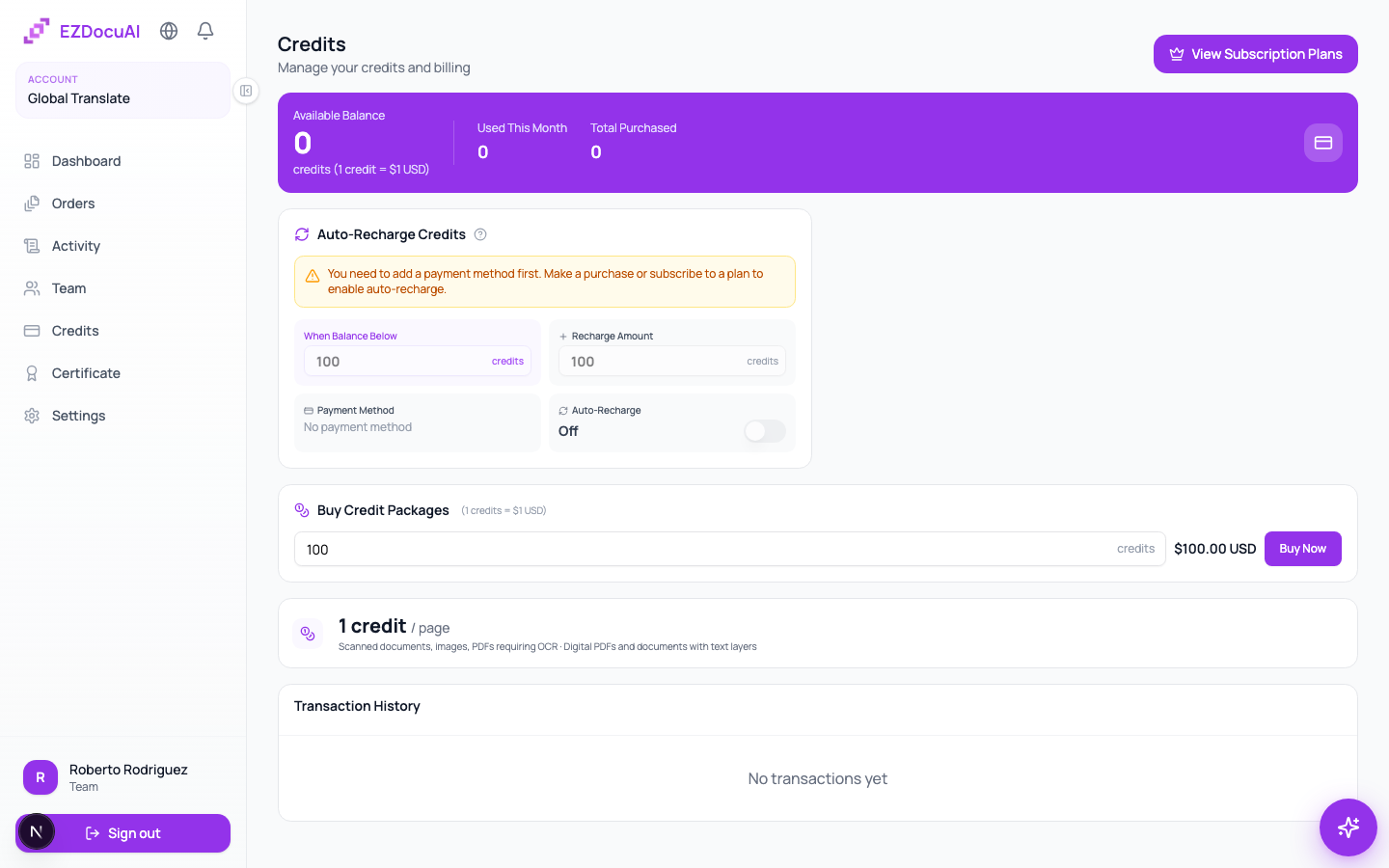
EZDocuAI charges per processed page — the same way you'd bill your clients per page, but for the AI side of the work. You can buy packs, subscribe to a monthly plan, or turn on auto-recharge so you never block a delivery on credits.
How many credits per page
1 credit per page, flat. Doesn't matter if the page is digital text (PDF/DOCX), a scan that needs OCR, or handwriting that needs AI transcription — same price. The processing method is shown in the file analysis panel (Direct (1 cr/page), OCR (1 cr/page)) so you know what's happening, but the cost is identical.
We show the exact total before you confirm the order, so you never get a surprise.
Where to see your balance
Open Credits from the sidebar. You'll see four blocks:
- Available balance — what you can spend right now.
- Used this month — consumption for the current month.
- Total purchased — lifetime total.
- Transaction history — paginated list of every purchase, usage, adjustment and refund.
How to buy credits
Three paths, each for a different usage profile:
1. Pay-as-you-go packs (occasional use)
In Buy credit packages, pick one of the packs. The bigger the pack, the better the discount. No recurrence — one-time payment.
2. Monthly or annual plan (consistent use)
Plans include credits that replenish on the 1st of each month. If you don't use them, they don't roll over. Benefits:
- Discount vs pay-as-you-go (up to 40% on annual).
- Premium features per plan: more certificate templates, custom branding, larger team seats, more glossaries / translation memories, API access, priority support.
Activate it in Subscription plans on the same screen.
3. Auto-recharge (zero friction)
You define a threshold and an amount: "when my balance drops below X, recharge Y credits automatically". Fires against your saved card.
How to enable:
- Scroll to Auto-recharge credits.
- Pick a threshold (e.g., 50 credits) and a recharge amount (e.g., 100 credits).
- Click Save changes.
💡 Tip: combine a monthly plan with auto-recharge as a buffer for peak months. You pay the plan base and the recharge only triggers if you exceed it.
Change or cancel your plan
In Your subscription two actions:
- Change plan — upgrade or downgrade. Credit prorating adjusts on the next cycle.
- Cancel subscription — your plan stays active until the paid period ends, then doesn't renew.
Payment methods
All payments run through Stripe. We accept credit and debit cards, plus some regional wallets. The card is encrypted in Stripe — we only have the token.
To change the card: Payment method → Change → Stripe Portal.
Refunds
| Case | Refund |
|---|---|
| You cancel an order before the AI draft is generated | 100% automatic |
| Platform technical error | 100% (manual by support) |
| You exported an order you didn't mean to | Case by case — open a ticket with context |
| Subscription cancel mid-period | No refund for period already paid |
Refunds show in the Transaction history with type Refund.
Invoices
Every purchase generates an invoice, emailed to the account owner and available in the history (Download invoice button). To update tax info, open Settings → Billing.
FAQ
Do credits expire? Pay-as-you-go credits don't expire. Plan credits renew monthly without rolling over.
Can I transfer credits to another account? No. Credits belong to the account that bought them.
What if I run out mid-order?
The order enters Payment required state. You have 7 days to top up and resume, after which it archives.
Do you charge VAT/sales tax? Depends on your country. If you've entered tax info, Stripe calculates and shows it at checkout.